

The imaging skill gets you licensed and operating. The business operations skill keeps you open. Many elective ultrasound studio owners enter the industry with strong technical preparation and underestimate how much of their day-to-day experience will be determined by systems — booking workflows, client communication protocols, session turnaround procedures, supply management, and the dozen other operational rhythms that make a studio either exhausting or sustainable to run. This guide is a practical operations resource for studio owners who want to run efficiently from day one.

Section 1: Booking and Scheduling Systems
Your booking system is the operational backbone of your studio. A friction-filled booking process loses clients before they ever walk through your door. An efficient one converts interest into appointments automatically, with minimal manual effort from you.
Choose Online Booking From Day One
Self-service online booking is the single highest-leverage operational decision a new studio owner can make. Clients expect to be able to book at 10pm from their phone. Studios that require phone calls or email exchanges to schedule lose a meaningful percentage of prospective clients who will not take that extra step. Platforms purpose-built for appointment-based businesses — including several designed specifically for the elective ultrasound market — handle scheduling, deposits, reminders, and cancellations automatically.
When evaluating booking software, look for: calendar sync with your personal calendar, automated confirmation and reminder emails, deposit or prepayment capability, a mobile-friendly client-facing interface, and the ability to show different session types with different durations and prices. Most platforms that meet these criteria charge $30 to $80 per month — a cost that pays for itself in the first recovered appointment.
Build Buffer Time Between Sessions
New studio owners frequently underestimate how much time each session requires beyond the imaging itself. Room turnover, gel cleanup, equipment adjustment, image saving and processing, and preparing any print or digital deliverables all take time. A 30-minute session scheduled back-to-back with another 30-minute session will run late almost every day. Build 15 to 20 minutes of buffer between appointments in your booking system from the beginning — it is much harder to add buffer time after clients are accustomed to a tighter schedule.
Automate Reminders and Pre-Session Communication
No-shows are costly in an appointment-based business. Automated reminder emails or texts — sent 48 hours before and again the morning of the appointment — reduce no-show rates significantly. Most booking platforms support this natively. Your reminders should include not just the time and address but any preparation instructions you want clients to follow: hydration recommendations, what to wear, where to park, and what to expect when they arrive. Clients who arrive prepared have better sessions and require less time managing expectations on the spot.
Establish a Clear Cancellation Policy
A written cancellation policy that clients acknowledge at booking protects your revenue and your schedule. Common structures include: full refund with 48 hours notice, partial refund or credit with 24 hours notice, and no refund for same-day cancellations. Whatever your policy, communicate it clearly at booking, include it in your confirmation email, and enforce it consistently. A policy that exists but is never applied provides no protection.
Operations Resource: Booking Checklist
- Online booking platform selected and configured
- Session types, durations, and pricing entered
- Deposit or prepayment requirement set
- Automated 48-hour and morning-of reminders active
- Cancellation policy written, posted, and acknowledged at booking
- Buffer time built between all appointments
- Calendar sync with personal calendar confirmed
Section 2: Client Experience Workflows
Every touchpoint a client has with your studio — from the first time they land on your website to the moment they leave after their session — is an experience you can either design intentionally or leave to chance. The studios that generate strong referrals and repeat bookings consistently design their client experience with the same care they bring to their imaging work.
The Intake Process
A brief intake form completed at booking — gestational age, expected number of guests, any relevant considerations, and how they heard about your studio — gives you the information you need to prepare for each session without consuming time on arrival. It also tells you which marketing channels are driving bookings, which is data you need to make informed decisions about where to invest your marketing energy going forward.
Intake forms can be built directly into most booking platforms or delivered as a separate step after booking confirmation. Keep them short — five to eight questions maximum. Clients who feel asked to fill out extensive paperwork before a celebratory appointment may feel the experience is more clinical than they expected.
The In-Studio Experience
First impressions are formed in seconds. Your space should feel clean, warm, and purpose-built for the experience you are providing. Lighting, seating for guests, the arrangement of the monitoring equipment so guests have a clear view, ambient music if appropriate for your brand, and a consistent greeting protocol all contribute to the emotional tone of the session before a single image is captured.
Establish a consistent session flow that you follow in the same order every time. This is not about being robotic — warmth and flexibility matter — but having a predictable internal structure helps you manage time effectively, cover everything you need to cover, and finish on schedule even when clients have many questions or want to linger. A repeatable flow also makes training additional staff significantly easier when you reach that stage.
Image Delivery
How and when clients receive their images significantly affects their overall satisfaction with the session. Define your image delivery process clearly and communicate it before the appointment. Common models include: digital delivery via online gallery within 24 hours, immediate USB delivery at the end of the session, printed images produced during or immediately after the session, or a combination. Each model has different time and cost implications. Choose one that you can execute consistently for every client at your current volume.
The Post-Session Follow-Up
A brief follow-up email sent 24 to 48 hours after each session serves multiple operational purposes. It delivers a link to their gallery if you use an online delivery model. It provides an opportunity to request a Google review. It can include a referral ask — a simple note that you would love to be introduced to any friends or family members expecting. And it gives clients a moment to respond if they have any questions about their images or their session. Very few studio operators do this consistently. Those who do report meaningfully higher review counts and referral rates than those who do not.
Section 3: Equipment and Supply Management
Operational efficiency includes knowing what you have, maintaining what you have, and never running out of what you need mid-session. Equipment and supply management is less glamorous than the client experience work but just as important to running a sustainable studio.
Preventive Maintenance Schedule
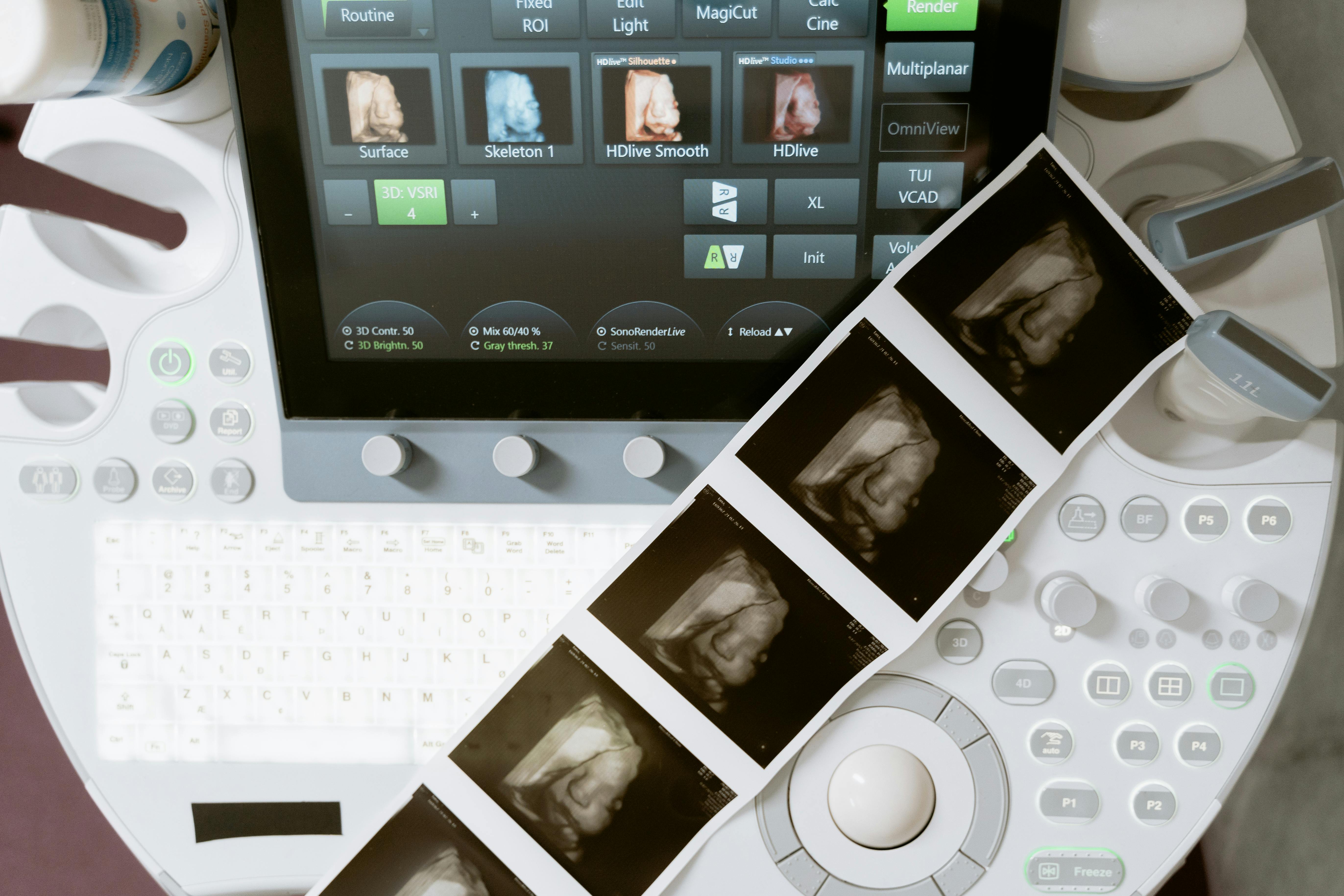
Your ultrasound machine is your primary revenue-generating asset. Every day it is out of service due to a preventable mechanical issue is revenue you cannot recover. Follow the manufacturer’s maintenance recommendations exactly. Keep a log of service dates, any issues observed, and the resolution. If your equipment requires a service contract or periodic manufacturer inspection, schedule those in advance and treat them as non-negotiable calendar commitments.
Know your machine’s failure modes. Transducer issues, cable wear, and cooling system maintenance are common maintenance considerations on actively used equipment. Understanding what to watch for means you catch small issues before they become large ones.
Consumable Inventory System
Ultrasound gel, thermal paper for printers, USB drives or other image delivery media, disposable transducer covers if used, cleaning and disinfection supplies — all of these need to be stocked consistently. Running out of any of them mid-session creates a client experience problem. Establish a minimum inventory threshold for each consumable and reorder when you hit that threshold, not when you run out. Most studio owners find that a simple tracking sheet or inventory list reviewed weekly is sufficient at launch volume. As you scale, more formal inventory management becomes worth the investment.
Backup Plans for Equipment Issues
What happens if your machine has an issue the morning before a fully booked day? Knowing the answer before it happens is considerably more comfortable than figuring it out under pressure. Identify your manufacturer’s service response time for urgent issues. Know whether your service contract or warranty includes a loaner provision. Have a communication template ready for clients in the event you need to reschedule due to equipment issues — the tone and promptness of that communication matters significantly to how clients perceive the situation.
Section 4: Financial Operations
Financial visibility is the difference between a studio owner who knows how their business is performing and one who is constantly surprised by their numbers. You do not need sophisticated accounting software to start — but you do need consistent habits from the beginning.
Track Revenue and Expenses Weekly
A simple spreadsheet that records every session booked, the package price, and any associated expenses gives you a weekly picture of where your business stands. Track revenue by session type so you know which packages your clients prefer and which are rarely chosen. After 90 days, you will have the data you need to make informed pricing and packaging decisions rather than guessing.
Separate Business and Personal Finances
A dedicated business checking account and business credit card makes bookkeeping dramatically simpler and ensures you have a clean financial picture of your studio’s performance separate from your personal finances. This is one of the first operational steps recommended for any new business, and one of the most commonly skipped by solo operators. It matters more as your revenue grows, but establishing the habit from the beginning saves significant time and confusion later.
Understand Your Break-Even Point
Knowing how many sessions per week you need to cover your fixed costs gives you a clear operational target. Add up your monthly fixed costs — lease or home studio overhead allocation, equipment payments, software subscriptions, insurance, and any other recurring expenses — and divide by your average revenue per session. The result is the minimum number of sessions per week you need to break even. Everything above that number is contributing to profit. Operators who know this number run their businesses differently than those who do not.
Operations Resource: Financial Foundations Checklist
- Business checking account open and active
- Business credit card established (separate from personal)
- Weekly revenue and expense tracking system in place
- Break-even session count calculated and known
- Bookkeeping method selected (DIY spreadsheet, software, or accountant)
- Quarterly estimated tax schedule on calendar
Section 5: Scaling Your Operations
The systems that work at five sessions per week may not work at twenty. Anticipating the inflection points where your current approach will need to evolve helps you scale without operational chaos.
When to Add a Second Operator or Employee
Most single-operator studios reach a natural capacity ceiling — a point where the owner is the bottleneck. Common signals that this inflection point is approaching: you are regularly turning away appointments due to scheduling constraints, administrative tasks are consuming significant time that could be spent on sessions, or you are experiencing burnout from handling all operations solo. Adding a part-time front desk or administrative function is often the first hire, relieving the owner of non-imaging tasks. Adding a second trained sonographer comes next, enabling the studio to take on more sessions per day.
Documenting Your Processes
The clearest signal that your studio is ready to grow is that you can document what you do in enough detail that someone else could follow it. Session flow, client communication protocols, equipment maintenance steps, supply ordering procedures, image delivery process — write each one down. This documentation is what makes it possible to train additional staff effectively and maintain consistent quality as your operation grows.
E-E-A-T Signal: Operations in Practice
Through our business consulting work with new studio owners, we have seen a consistent pattern: the operators who document their processes early — even when it feels like unnecessary work at a low volume — grow significantly faster when they are ready to scale. The documentation does not just enable hiring; it creates accountability and consistency that clients notice and respond to through higher review scores and stronger referral behavior.
Frequently Asked Questions
What booking software do elective ultrasound studios typically use?
There is no single dominant platform in this specific market. Studio owners use a range of general appointment-booking tools, some of which have been customized or are more commonly adopted within the elective ultrasound industry. Key evaluation criteria: online booking with deposit capability, automated reminders, mobile-friendly interface, and calendar sync. Talk to studio owners in non-competing markets about what they use — community forums and training networks are good sources of practical recommendations.
How many sessions per day can a single operator realistically handle?
Most single operators find six to eight sessions per day manageable with appropriate buffer time between appointments. Beyond that, session quality and operator stamina begin to decline. How many sessions per day is sustainable depends on session length, room turnover efficiency, whether you handle your own administrative work, and your own physical and mental stamina. Track how you feel on your highest-volume days and build your schedule accordingly.
Should I require deposits for bookings?
Yes, strongly recommended. A deposit — typically 25 to 50 percent of the session fee — significantly reduces no-show rates and last-minute cancellations. Clients who have committed money to an appointment treat it differently than one they can cancel without consequence. Most booking platforms support deposit collection natively. The deposit can be applied toward the session total at checkout.
What are the most common operational mistakes new studio owners make?
The most common: underestimating session turnaround time and scheduling too tightly, failing to collect deposits and experiencing high no-show rates, not tracking where bookings come from so marketing decisions are made without data, delaying the switch to online booking by relying on phone scheduling, and not having a post-session follow-up process that systematically requests reviews and referrals. Most of these mistakes are fixable once identified, but they cost time and revenue while in place.
How do I handle a situation where a client is unhappy with their images?
Image quality in elective 3D/4D ultrasound is influenced by factors outside your control — fetal position, amount of amniotic fluid, placenta location, and gestational age all affect what is possible in any given session. Managing client expectations before the session is your most important tool. Explain clearly at booking — and again when they arrive — that image quality varies and that fetal position in particular is unpredictable. When clients understand this going in, they are far less likely to be disappointed with results that are simply a function of where the baby is positioned on that day. Having a clear policy about re-scans or session credits for genuinely poor-outcome sessions gives you a structured way to handle the rare case where a client leaves unsatisfied.
For studio owners who want personalized guidance on building operational systems that match their specific setup, Ultrasound Trainers offers direct consulting support. Our comprehensive business training program covers both the operational and marketing systems that new owners need to build a sustainable practice.
Get Your Operations Right From the Start
Ultrasound Trainers works with new studio owners on both the technical and business sides of launching and running an elective ultrasound studio. If you want experienced guidance on setting up systems that scale, we are here to help.
Connect With Our TeamAbout This Content: Ultrasound Trainers provides elective ultrasound training, equipment guidance, and business consulting for people entering the elective ultrasound industry. This article is for informational and educational purposes. Business outcomes vary based on many factors including market conditions, operator skill, and execution quality.
Get the Inside Track
Training tips, business advice, and exclusive deals delivered straight to your inbox.

How to Get More Bookings for Your Elective Ultrasound Studio in Montana
Struggling to fill your elective ultrasound booking calendar in Montana? This guide covers what actually[...]

Buying an Elective Ultrasound Machine for an Arkansas Studio: What Actually Matters
Ready to buy an elective ultrasound machine for your Arkansas studio? This guide covers the[...]

How to Build a Pre-Launch Marketing Campaign for Your Elective Ultrasound Studio: A 60-Day Countdown Plan
Pre-launch marketing for an elective ultrasound studio begins 60 days before opening. This 60-day countdown[...]

What Career Changers in Hawaii Need to Know About Elective Ultrasound Training
Considering ultrasound training for a career change in Hawaii? This Q&A guide covers what training[...]

How to Find and Recruit Volunteer Scan Models for Elective Ultrasound Practice
Finding volunteer models for elective ultrasound practice is a skill in itself. Learn where to[...]

How to Write an Elective Ultrasound Business Plan That Actually Works
Writing an elective ultrasound business plan? This guide covers what to include, how to build[...]

How to Open an Elective Ultrasound Business in Honolulu: A Practical Startup Guide
Open an elective ultrasound business in Honolulu with confidence. This guide covers training, startup costs,[...]

Adding Elective Ultrasound to an Existing Photography or Doula Practice in Montana
Montana birth photographers and doulas: adding an elective ultrasound add-on business in Montana to your[...]

Starting an Elective Ultrasound Business in Cheyenne, Wyoming: First-Mover Advantage in the Least-Crowded Market in the Country
Thinking about starting an elective ultrasound business in Cheyenne, Wyoming? This guide covers the F.E.[...]

Elective Ultrasound Training for Career Changers in Sweden
Considering a career change into elective ultrasound in Sweden? Find out what training involves, whether[...]

What Career Changers in Fayetteville Should Know About Elective Ultrasound Training
Thinking about elective ultrasound training in Fayetteville, Arkansas as a career changer? This Q&A guide[...]

The Biggest Mistake Las Vegas Elective Ultrasound Studios Make With Their Marketing
Elective ultrasound studio marketing in Las Vegas prioritizes trust and reviews over ad spend. Here's[...]
